
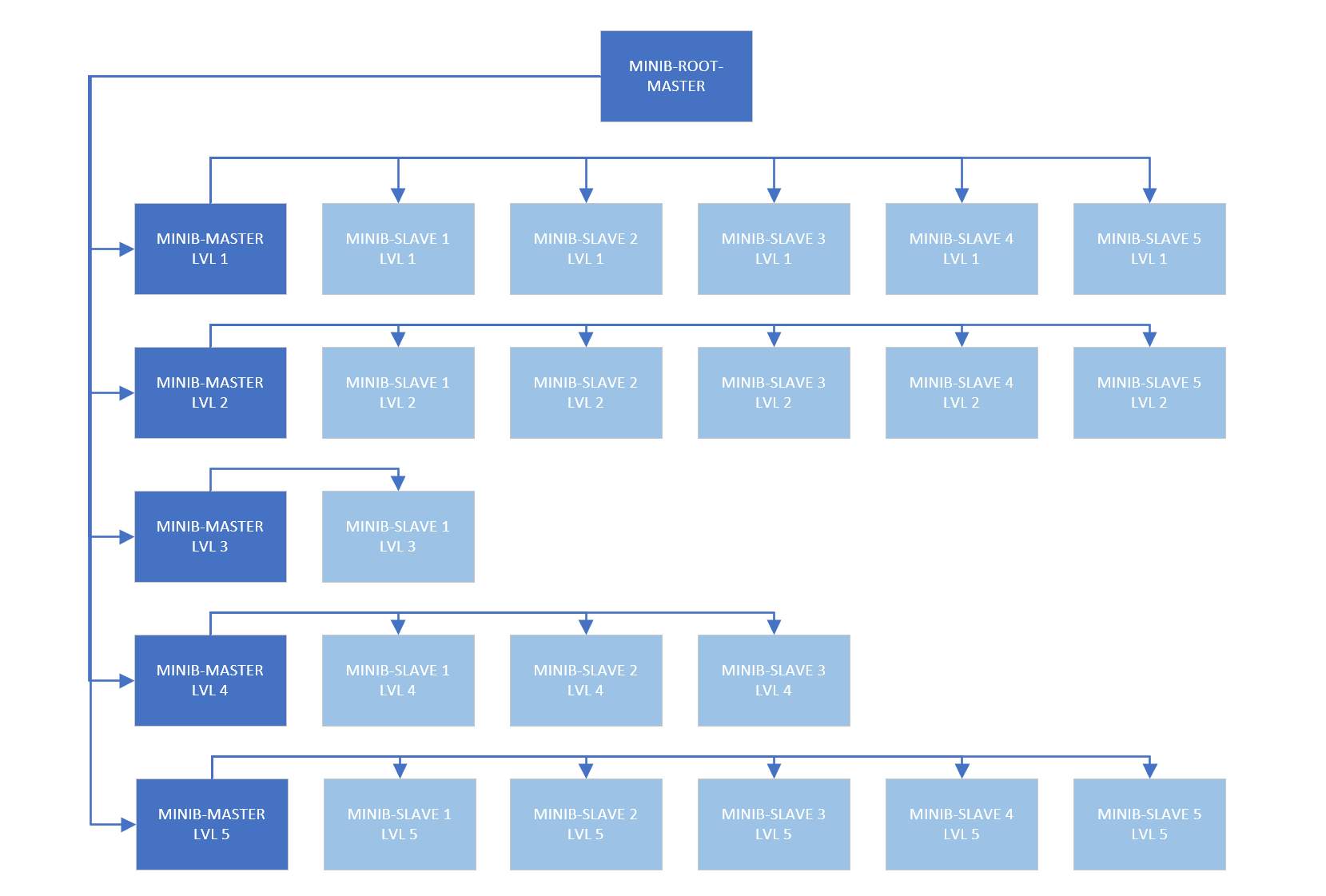
What is it?
Host Manager is a tool that turns multiple independent servers into a single manageable network. You log into one server (your “command center”), see a list of all connected servers, select any server — and get full access to its control panel, as if you logged into it directly. Switching between servers happens instantly, like switching between browser tabs.
The Main Idea
You have many servers spread across different offices, cities, or even countries. Instead of remembering 10 addresses, 10 passwords, and keeping 10 browser bookmarks, you log into one server and from there manage all the others.
But most importantly — the architecture does not restrict you with a rigid hierarchy. You decide who manages whom.
What can you do?
1. Switch between servers like browser tabs
- Open the control panel on your main server
- See a list of all connected servers
- Click on any server — the interface switches to managing that server
- Get access to all its functions: metrics, settings, file management, backups — everything you have on your main server
2. Remember nothing
- No need to remember each server’s IP address
- No need to store separate logins and passwords
- No need to keep 10 browser tabs open
3. Build flexible hierarchies with unlimited nesting
The system does not limit you to a “one master — all others are slaves” scheme. You can build any structure:
- A Level 10 server obeys its direct master (Level 10)
- And simultaneously — a Level 8 server
- And a Level 5 server
- And the main Level 0 server
One server can be a slave to multiple masters at different levels.
4. Be both a master and a slave simultaneously
- A Level 7 slave can be a master for a Level 3 slave
- The same server — both obeys others and manages others
5. Transfer control temporarily
- If a regional administrator goes on vacation — another temporarily gets control of their servers
- When the first returns — control is transferred back
6. Control access selectively
- Each server decides who can manage it
- You can give access to the main office but not to an intermediate level
- Or vice versa
7. Accept or reject connection requests
- When another server wants to connect to you — you receive a request
- You decide: do you trust this server or not?
- All unconfirmed requests sit in a queue and don’t interfere with work
8. Rotate access keys (for security)
- If an access key is compromised — you generate a new one with one click
9. Turn “reception mode” on or off
- There is a switch that allows or denies other servers from sending you connection requests
Key Principle: Multiple Masters, Not Automatic Hierarchy
The system does not build hierarchy automatically “from top to bottom.”
If a Level 0 master wants to manage a Level 10 slave, it is not enough for the Level 0 master to be “higher up the chain.”
For direct management, each master must be explicitly added to the target server’s master list.
How it works
On the Slave 10 server, in its control panel, the master list might look like:
My masters (who can manage me):
├── Master 10 (direct supervisor)
├── Master 5  (higher-level administrator)
├── Master 0  (main IT director)
└── Master 8  (neighboring regional administrator, temporary)
All of them can switch to Slave 10 and manage it as their own.
Why this approach?
| Automatic Hierarchy (Traditional Systems) | Flexible Scheme (Host Manager) |
|---|---|
| Master 0 automatically manages EVERYTHING | Master 0 only manages those explicitly added to him |
| Cannot exclude anyone from management | Can grant access selectively |
| Everyone sees everything (or nothing) | Each sees exactly what they are allowed to see |
Who is this for?
| User | How they use it |
|---|---|
| System Administrator | Manages dozens of servers from one panel, switching between them instantly |
| Company Owner | Keeps office server, cloud server, and backup server under control from one place |
| IT Integrator | Sets up a single management point for multiple client sites |
| Large Organization with Branches | Builds hierarchy: HQ → Regions → Cities → Departments |
| Homelab Enthusiast | Connects home NAS, cottage server, and VPS into one network |
Real-World Examples
Example 1: Simple Network
You have three servers: at the office, in the cloud, and at a partner’s site.
Without Host Manager: Three different addresses, three passwords, three browser tabs.
With Host Manager: Log into your office server, see a list of three servers. Click on the cloud server — the panel switches to it. Click on the partner’s server — switches to it. All functions — right there.
Example 2: Large Retail Chain
Levels:
- Level 0 — Headquarters (IT Director)
- Level 1 — 5 Regional Centers (Regional Administrators)
- Level 2 — 50 Stores (each with its own server)
What you get:
- Regional administrator manages stores in their region
- Neighboring regional administrator temporarily gets control while a colleague is on vacation
- Main IT director can take direct control of any store at any moment
- A store can simultaneously obey both its regional administrator and headquarters
Example 3: Temporary Management Transfer
Situation: A regional administrator is sick or on vacation.
Solution: On the servers they managed, an additional master is temporarily added — the substitute administrator. When the first returns — the additional master is removed.
Example 4: Selective Access
Situation: Headquarters should not see every small server in the branches — only key nodes.
Solution: Headquarters is added as a master only on those servers that should be visible to them. The rest remain “invisible” to headquarters.
What you get in the end
| Capability | How it’s implemented |
|---|---|
| Single point of entry | One server — access to all |
| Instant switching | Click on a server — you manage it |
| Unlimited nesting | Level 10 server can be managed from any level |
| Multiple masters per slave | Server can obey any number of masters |
| Temporary control transfer | Add temporary master → remove later |
| Selective access | Don’t add a master to the server’s list |
| No automatic inheritance | Each relationship is created manually |
| Full functionality on remote server | Not limited monitoring, but full management |
Brief overview of the connection process
To add a new server to your “command center”:
- The remote server sends a connection request
- You see this request in your panel
- You review and accept it (if you trust it)
- After this, the server appears in your list
- You can switch to it and manage it
Important: If you want this server to also be able to manage you — you need to add the reverse connection as well.
Important Warning
For Host Manager to work correctly, all hosts (servers) in the network must meet the following requirements:
| Requirement | Description |
|---|---|
| HTTPS | All hosts must be configured to use HTTPS. HTTP is not supported for cross-server communication. |
| DNS names | Each host must have a DNS name (domain). Using IP addresses is not allowed for proper server switching functionality. |
About Certificates
- Both paid (issued by a trusted Certificate Authority) and self-signed certificates are acceptable.
- When using self-signed certificates, it is strongly recommended to add them to the trusted store on all hosts that will connect to them.
- This will prevent browser warnings and errors when switching between servers.
Note: Without properly configured DNS names and HTTPS, cross-server switching may work incorrectly or be completely unavailable.
Post date: 01.06.2026